How to Track Grassroots Football Stats (Without Spreadsheets)
19 Aug 2025 • Updated 19/08/2025 • SquadStats
Welcome to the moment where the WhatsApp banter meets actual numbers. If you manage or captain a grassroots team, you’ve probably tried a notes app, a Google Sheet, or a very determined memory. It works, right up until the second substitution and a scrappy goal off someone’s shin.
This guide shows a clean, repeatable workflow for tracking lineups, goals, assists (and own goals), clean sheets, and win rates with SquadStats. No spreadsheets and no faff. You’ll be publishing a match with shareable stats in minutes.
What you’ll get from this workflow
By the end of a single game you’ll have:
- A published match card with score, scorers, assisters, and MOTM
- Automatic win/draw/loss, form strips, Ballon d’Or Index, and clean-sheet rate
- Player pages that build a season story — head-to-heads, averages, and trends
You should know: everything below also works for friendly kick-abouts, 5-a-side, and mixed squads. You can log subs and own goals too.
1) Before kick-off: set the stage once
Open the app and add your players to the Players list. You only do this once, and you can mark keepers as GK so clean sheets calculate correctly later. If you run a league season, create the Season so all matches fall into the right window.
Now tap Add Game. Pick the game type, date, venue, choose home/away if you’re playing an external opponent, or stick with Bibs vs Non-Bibs for internal games.
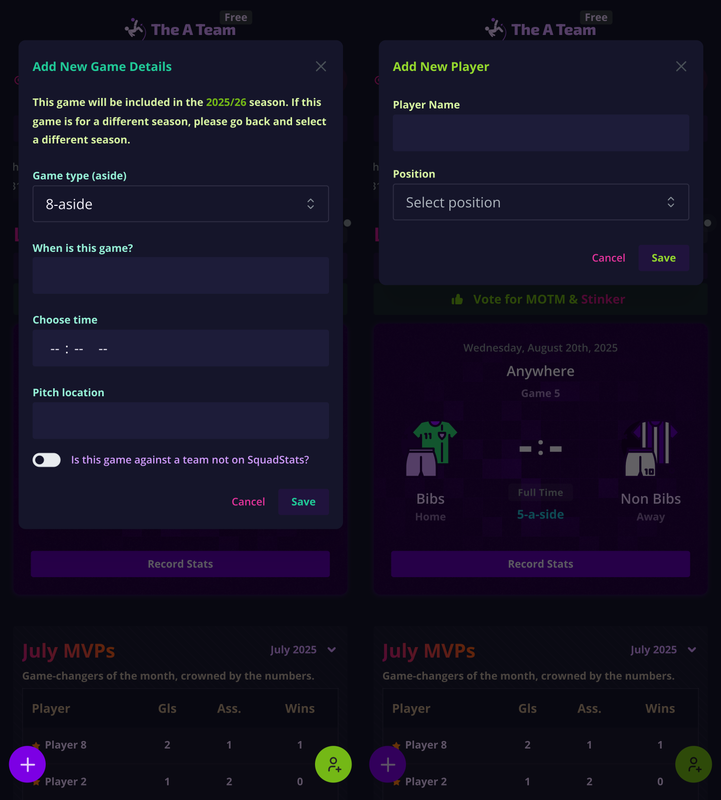
Tip: Got a new signing at the pitch? Add them right there. Players without previous stats still appear in selections and will start accumulating from today.
2) Get the lineups right
You don’t need to fill everything at once. Start with the basics:
Lineup first.
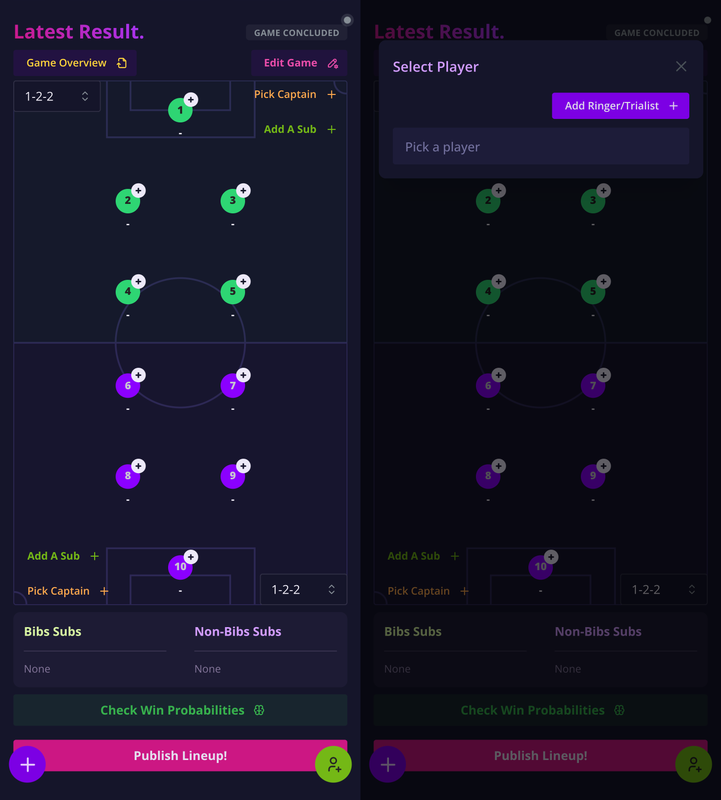
Pick your formation, Select your starters. If you know someone’s arriving late, leave their slot free and add them as a sub later. Substitutes count as appearances. Next, before publishing, you’d want to also select captain(s).
Keepers just work.
If a GK plays, goals conceded and clean sheets are inferred from the final score and side they played on. No need to enter those manually.
3) During the game: keep it light (log after kick-off +1h)
Heads-up: SquadStats opens match logging 60 minutes after the scheduled kick-off. That’s intentional. So coaches can focus on the game, not admin.
While the match is on, just jot quick notes (phone notes work fine). Capture:
- Goals & who scored (note assister if known; mark OG for own goals)
4) After the whistle: publish and share
When the +1h window opens (or right after full-time):
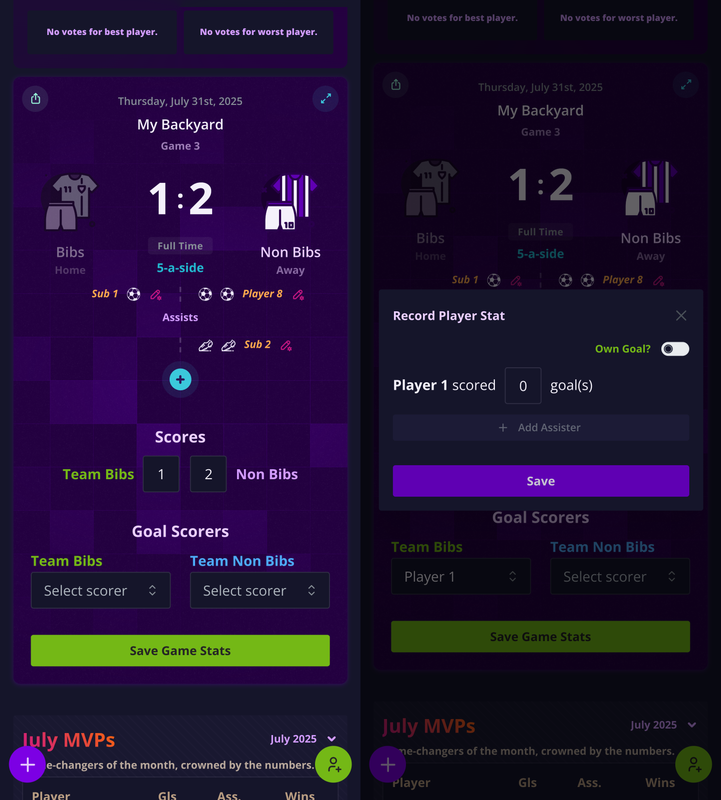
- Open the game and batch enter scorers/assisters.
- Toggle Own Goal where needed. SquadStats automatically puts it in the opposite team’s bucket and excludes it from the scorer’s personal tally.
Speed trick: The “Record Stat” modal lets you add multiple assisters for the same goal and merges repeat scorers so totals stay tidy, even when you enter everything at once post match.
Once the result is final, hit Publish. Your team instantly gets:
- A match card everyone can reference
- Updated leaderboards (including Ballon d’Or Index)
- Player pages with recent form, goals/assists per game, and head-to-head nuggets
This is the moment the chat changes from “I swear I scored two” to “Here’s the link.”
5) What stats are automatic (so you don’t chase them)
Think of SquadStats as a small analyst in your pocket. From the data you log, it derives:
- Team: wins/draws/losses, goals for/against, clean sheets, trends
- Players: appearances (incl. subs), goals (own goals excluded), assists, averages
- Keepers: goals conceded, clean sheets, conceded-per-game
- Form: last-5 strip (W/D/L), Ballon d’Or Index (weighted impact metric)
No spreadsheet formulas. No missed tallies.
6) A quick Saturday-league example
You’re at the cage for a 7-aside. You pick your home seven, set the bench, and kick off. Ten minutes in, Kofi smashes one in? Tap his name, add the assist to Ayo. At half-time you swap your winger for Jamie, then later record a late own goal from the opposition. Full-time: 2–1.
On the bus home you publish. Instantly, the leaderboard rankings shift. Kofi jumps to the top 3 for BDI, your keeper gets another clean sheet denied by that own goal (sorry!), and everyone can see the trend line turning green.
Common mistakes (and easy fixes)
“We forgot the assister.”
Don’t sweat it. Open the game afterwards and add it. The tables re-calculate.
“We didn’t mark the GK.”
Edit the player to GK and the clean sheet logic will apply going forward.
“Own goal went to our striker.”
Edit the event, toggle Own Goal, and it’ll switch to the other team automatically and stop counting toward the striker’s tally.
FAQ
Do subs count as appearances?
Yes. Starter or sub, an appearance is an appearance. Fair and square.
Can I track external opponents?
Absolutely. Add an Opponent name; SquadStats will handle home/away and keep your internal team stats consistent.
What about player profiles and transfers?
Players stay tied to your group. Deactivate a player if they move on; their historical stats remain in your season history.
Does the Ballon d’Or Index punish keepers?
No. Keepers get credit for clean sheets and a goals conceded per game factor. It’s not perfect (nothing is), but it’s balanced.
How much effort is this, honestly?
Under a minute to start the match, a few taps per goal, and one publish button at the end. The payoff? Real stats, proper leaderboards is huge.
Try it free with your next game
Start free at squadstats.app.
Log one match. Share the link. From there, the numbers do the talking and the arguments get settled before the pints arrive.